How it works
- Open Account, then New budget. Name it, pick an icon and a currency, and choose whether to copy your personal categories across.
- Tap Invite. Aviary gives you a link and a six-letter code. Send either on WhatsApp.
- They tap the link, or type the code into Join with a code. They’re in, on their own phone, with their own sign-in.
- Everyone logs into the same categories. Groceries is one jar, and it goes down whoever paid.
One plan covers everyone
Only the person who made the budget needs a subscription. Up to 5 others join free and never see a paywall for it. There’s no family tier and no per-seat price. If you want to split the cost between you, that’s between you.
See who logged what
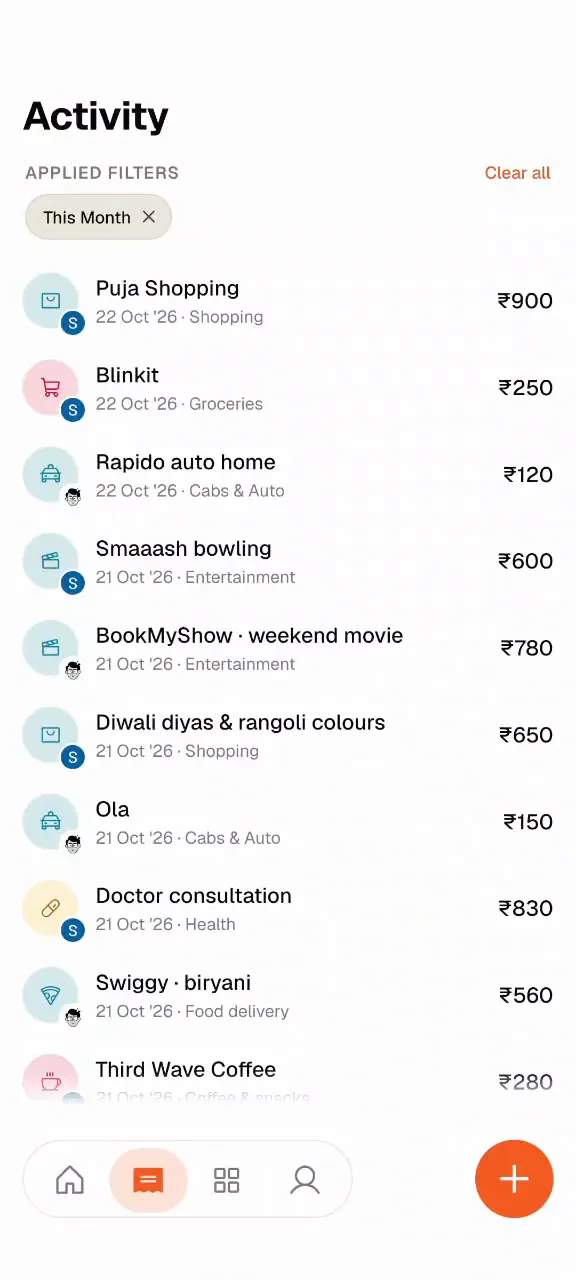
Every spend shows the face of the person who logged it, in Activity and in each category. Switch on “Tell me when others log” and Aviary sends a notification the moment someone else logs, like “Sara logged in Family · Puja Shopping · ₹900 · Shopping”. It’s off by default.
Yours stays yours
Your personal budget is separate and private. Switch between budgets at the top of Home. Each person can be in up to 5 budgets, so the flat, a trip and the wedding can each have their own, with different people in each.
Leaving, handing over, deleting
Anyone can leave a budget from Family members. The owner can remove someone, or make someone else the owner. If the owner deletes the budget, members see who deleted it, and the owner can restore it within 30 days.
Still no bank link
A shared budget is logged the same way as a personal one: by the person who spent. Nudges, bill scanning and catching up from a statement all work inside it. Read why Aviary works that way on budgeting without linking your bank.